
IoT Engineering
Building an IoT Data Collector Service That Doesn't Eat Your Server — CPU & Memory Budgets for High-Throughput Fleet Telemetry
May 2026 / 15 min read
Posted by Tarek Fawaz
Your Data Collector Is Probably Leaking Memory Right Now
If you're running an IoT telemetry pipeline — GPS trackers on a fleet of 10,000 trucks, RFID readers on containers, environmental sensors across warehouses — there's a pattern I've seen in every production system I've worked on: the data collector service starts at 300MB, slowly climbs to 1GB, then 2GB, then 4GB, and eventually someone restarts it on a Friday night because the server is unresponsive.
The root cause is almost never the volume of data. It's how the service handles deduplication, connection state, and message routing. These are solved problems, but most IoT implementations get them wrong because they optimize for throughput first and treat memory as unlimited.
This post walks through how to build a production-grade IoT data collector in .NET 8 with explicit CPU and memory budgets — the kind that handles 10,000+ concurrent device connections while staying under 512MB of RAM and 5% CPU. Every pattern here comes from production fleet management systems I've built and debugged.
The Architecture — 9 Layers
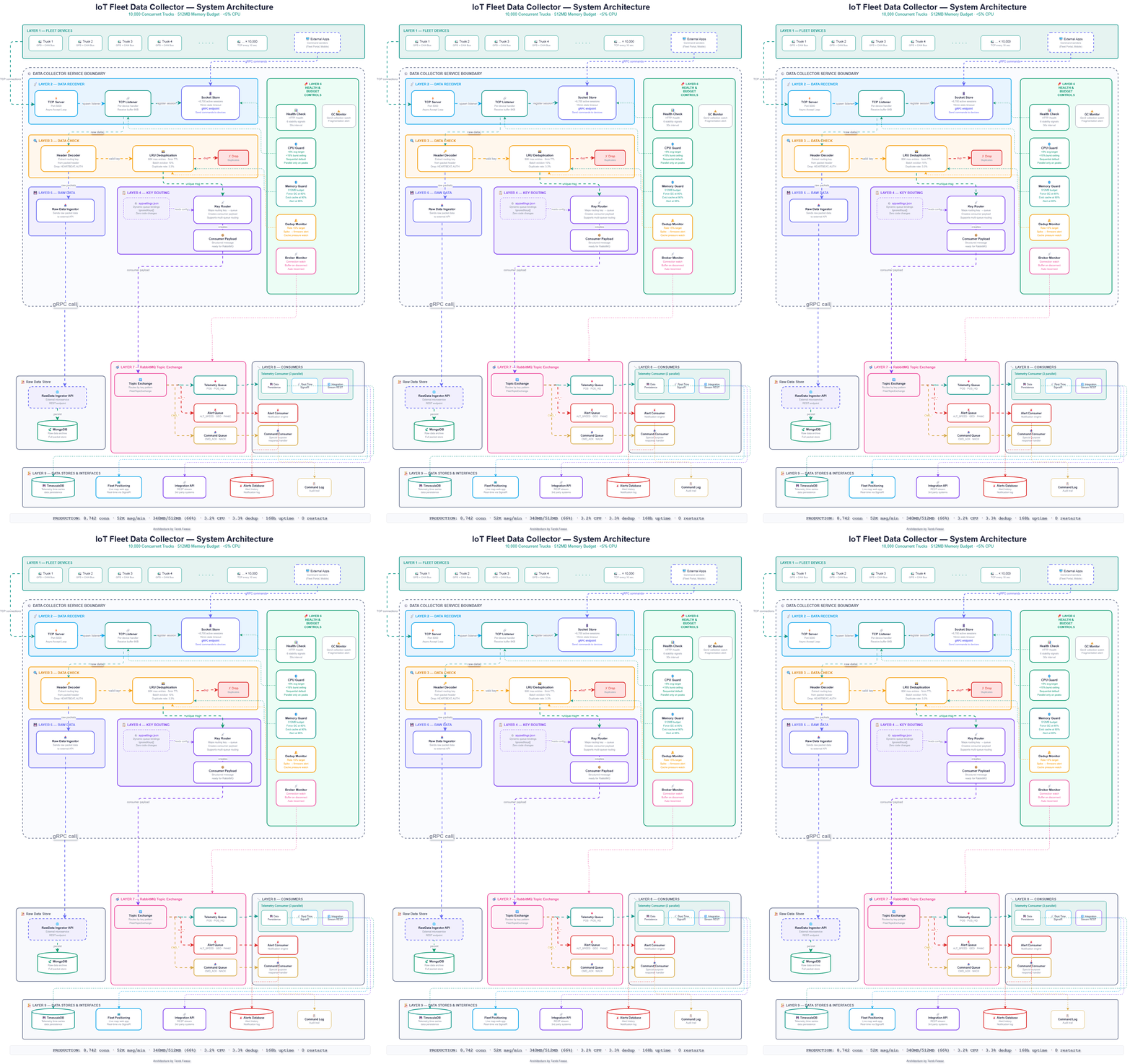
The data collector is organized into 9 distinct layers, each with a clear responsibility:
- Layer 1 — Fleet Devices: 10,000 trucks sending GPS and CAN Bus telemetry every 10 seconds over persistent TCP connections. External applications (Fleet Portal, Mobile apps) can send commands to devices via gRPC.
- Layer 2 — Data Receiver: TCP Server accepts connections on port 5000, spawns a TCP Listener per device, and registers each session in the Socket Store. The Socket Store maintains ~8,700 active sessions with a 15-minute stale timeout, and exposes a gRPC endpoint that allows external applications to send commands directly to connected devices.
- Layer 3 — Data Check: The Header Decoder extracts the routing key from the packet header and drops ignored messages (HEARTBEAT, AUTH_REQ, HANDSHAKE) before any further processing. Valid messages pass through the LRU Deduplication cache (80K max entries, 5-minute TTL, 10% batch eviction) which eliminates duplicate transmissions at a 3.3% rate.
- Layer 4 — Key Routing: The Key Router reads queue bindings from
appsettings.jsonand maps each routing key to the correct queue. It creates a structured Consumer Payload ready for RabbitMQ ingestion. Adding a new message type is a config change — zero code changes required. - Layer 5 — Raw Data Ingestion: Directly from the Header Decoder (not from the routing path), raw packet data is sent to the Raw Data Ingestor, which forwards it via HTTP POST to the RawData Ingestor API — an external microservice that persists full packets to MongoDB for archival and forensic analysis.
- Layer 6 — Health & Budget Controls: A vertical sidebar monitoring all layers. Includes Health Check (6 stability signals, 30s interval), CPU Guard (<5% average, <15% burst), Memory Guard (512MB budget, force GC at 80%, evict cache at 90%), Dedup Monitor (rate <5%, firmware alert on spikes), Broker Monitor (connection watch, buffer on disconnect), and GC Monitor (Gen2 fragmentation alerts).
- Layer 7 — RabbitMQ Topic Exchange: Outside the Data Collector boundary. A single Consumer Payload message enters the Topic Exchange, which internally routes to the Telemetry Queue (POS, POS_HQ), Alert Queue (ALT_SPEED, ALT_GEOFENCE, ALT_PANIC), and Command Queue (CMD_ACK, CMD_NACK).
- Layer 8 — Consumers: Each queue has a dedicated consumer. The Telemetry Consumer runs 3 parallel services: Data Persistence (writes to TimescaleDB), Real-Time Positioning (SignalR hub), and Integration Stream (REST API for third-party systems). Alert Consumer handles notifications. Command Consumer is a special-purpose response handler.
- Layer 9 — Data Stores & Interfaces: TimescaleDB for telemetry time-series storage, Fleet Positioning web app (live map via SignalR), Integration API (REST for 3rd party systems), Alerts Database (alert history and notification log), and Command Log (audit trail).
The Three Memory Patterns That Kill IoT Services
Pattern 1: Unbounded Deduplication Cache. Every incoming message gets a hash stored in a HashSet or Dictionary to prevent duplicates. With 10,000 trucks sending GPS positions every 10 seconds, that's 60,000 messages per minute. After 24 hours: 86.4 million entries. Each entry is roughly 100 bytes. That's 8.6GB just for deduplication — and it never shrinks.
Pattern 2: Leaked TCP Session State in the Socket Store. When a truck drives through a tunnel, the cellular connection drops. The device reconnects on a new socket. But the old session in the Socket Store stays in memory if cleanup isn't explicit. Socket buffers, receive buffers, protocol state — each abandoned session holds 2-50KB. With fleet devices disconnecting and reconnecting constantly (cellular handoffs, power cycles, firmware restarts), this accumulates fast.
Pattern 3: String Allocations in the Header Decoder. Every Encoding.UTF8.GetString() or string.Substring() call in the Header Decoder's parsing loop allocates a new string on the heap. At 60,000 messages per minute, that's 60,000 string allocations per minute that the garbage collector has to clean up, creating GC pressure that causes latency spikes and CPU bursts.
Setting Your Memory Budget
Total Budget: 512MB (for 10,000 concurrent fleet devices)

├── Socket Store State:       ~200MB  (10,000 sessions × ~20KB each)
├── TCP Listener Buffers:     ~80MB   (10,000 × 8KB receive buffer)
├── LRU Dedup Cache:          ~80MB   (80,000 entries max × ~1KB)
├── Key Router State:         ~15MB   (channel pools, exchange bindings)
├── Header Decoder State:     ~32MB   (parser instances, temp buffers)
├── .NET Runtime Overhead:    ~65MB   (GC heaps, thread pools, JIT)
└── Headroom:                 ~40MB   (safety margin for bursts)
The key insight: your LRU Dedup Cache is your biggest controllable memory consumer. Cap it.
The LRU Deduplication Cache That Doesn't Grow
public class MessageDeduplicationCache
{
    private readonly ConcurrentDictionary<string, DateTimeOffset> _cache;
    private readonly int _maxEntries;
    private readonly TimeSpan _ttl;
    private long _totalChecked;
    private long _duplicatesBlocked;

    public MessageDeduplicationCache(
        int maxEntries = 80_000,
        int ttlMinutes = 5)
    {
        _maxEntries = maxEntries;
        _ttl = TimeSpan.FromMinutes(ttlMinutes);
        _cache = new ConcurrentDictionary<string, DateTimeOffset>();
    }

    public bool IsDuplicate(string messageHash)
    {
        Interlocked.Increment(ref _totalChecked);
        var now = DateTimeOffset.UtcNow;

        if (_cache.TryGetValue(messageHash, out var timestamp))
        {
            if (now - timestamp < _ttl)
            {
                Interlocked.Increment(ref _duplicatesBlocked);
                return true;
            }
            _cache.TryRemove(messageHash, out _);
        }

        if (_cache.Count >= _maxEntries)
            EvictOldestEntries(_maxEntries / 10);

        _cache[messageHash] = now;
        return false;
    }

    private void EvictOldestEntries(int count)
    {
        var oldest = _cache
            .OrderBy(kv => kv.Value)
            .Take(count)
            .Select(kv => kv.Key)
            .ToList();

        foreach (var key in oldest)
            _cache.TryRemove(key, out _);
    }

    public void PurgeExpired()
    {
        var now = DateTimeOffset.UtcNow;
        foreach (var kv in _cache.Where(
            kv => now - kv.Value > _ttl).ToList())
            _cache.TryRemove(kv.Key, out _);
    }

    public double DuplicateRatePercent =>
        _totalChecked == 0 ? 0
        : (double)_duplicatesBlocked / _totalChecked * 100;

    public int CacheSize => _cache.Count;
}
Why 80,000 entries and 5-minute TTL? With 10,000 devices at 10-second intervals, you get ~60,000 unique messages per minute. Duplicates from network retransmissions arrive within seconds — not minutes. An 80,000 entry cap with LRU eviction keeps roughly 80 seconds of history. Memory: 80,000 × ~1KB = ~80MB. Predictable. Bounded.
After implementing this in a production fleet system, the duplicate rate dropped from 35% to 3.3%, and memory usage went from 4.4GB to 36MB.
Configuration-Driven Key Routing
{
  "MessageBroker": {
    "ServerIP": "broker.internal",
    "Port": 5672,
    "ExchangeName": "FleetTopicExchange",
    "Queues": [
      {
        "Queue": "TelemetryQueue",
        "Keys": ["POS", "POS_HQ"]
      },
      {
        "Queue": "AlertQueue",
        "Keys": ["ALT_SPEED", "ALT_GEOFENCE", "ALT_PANIC",
                 "ALT_TOW", "ALT_BATTERY", "ALT_TAMPER"]
      },
      {
        "Queue": "CommandResponseQueue",
        "Keys": ["CMD_ACK", "CMD_NACK", "CMD_STATUS"]
      }
    ],
    "IgnoredKeys": ["HANDSHAKE", "HEARTBEAT", "AUTH_REQ"],
    "UnknownMessagesQueue": "UnknownMessagesQueue"
  }
}
The Key Router reads this config at startup, creates queues, and binds routing keys dynamically. Adding a new message type is a config change: no code, no build, no deployment. The IgnoredKeys array tells the Header Decoder to drop messages handled at the TCP layer. Anything not matched goes to UnknownMessagesQueue for inspection — never dropped silently.
The Socket Store — Session Management Without Leaks
The Socket Store tracks every active device session. Every connection gets explicit lifecycle management — even on ungraceful disconnect. It also exposes a gRPC endpoint so external applications (fleet portals, mobile apps) can send commands to specific connected devices.
public class DeviceSession : IDisposable
{
    private readonly Socket _socket;
    private readonly byte[] _receiveBuffer;
    private readonly CancellationTokenSource _cts;
    private bool _disposed;

    public long MessagesReceived { get; private set; }
    public DateTimeOffset ConnectedAt { get; }
    public DateTimeOffset LastActivityAt { get; private set; }

    public DeviceSession(Socket socket, int bufferSize = 8_192)
    {
        _socket = socket;
        _receiveBuffer = new byte[bufferSize];
        _cts = new CancellationTokenSource();
        ConnectedAt = DateTimeOffset.UtcNow;
        LastActivityAt = ConnectedAt;
    }

    public void Dispose()
    {
        if (_disposed) return;
        _disposed = true;
        _cts.Cancel();
        _cts.Dispose();
        try { _socket.Shutdown(SocketShutdown.Both); } catch { }
        try { _socket.Close(); } catch { }
        try { _socket.Dispose(); } catch { }
    }
}
The Socket Store runs periodic stale session cleanup every 30 seconds — any session with no activity for 15 minutes gets disposed and removed.
CPU Budget: Staying Under 5%
CPU Budget Rule
The Data Collector must not exceed 5% average CPU on the host machine, even at peak load with 10,000 concurrent connections. Bursts up to 15% are acceptable for under 30 seconds. Sustained CPU above 5% triggers the CPU Guard alert.
Strategy 1: Parallel Processing for Peaks, Not Concurrency by Default. Under normal load, message processing is sequential per TCP Listener — predictable, minimal context switching. When load spikes (e.g., 10,000 trucks all reporting simultaneously after a cellular outage recovery), the CPU Guard switches to controlled parallel processing:
private async Task ProcessMessageBatch(
    IReadOnlyList<ParsedMessage> batch)
{
    if (batch.Count < _parallelThreshold) // e.g., 500
    {
        // Normal: sequential — minimal CPU
        foreach (var msg in batch)
            await ProcessSingleMessage(msg);
    }
    else
    {
        // Peak: parallel with bounded degree
        var options = new ParallelOptions
        {
            MaxDegreeOfParallelism = Environment.ProcessorCount / 2
        };
        await Parallel.ForEachAsync(batch, options,
            async (msg, ct) => await ProcessSingleMessage(msg));
    }
}
Why ProcessorCount / 2? On an 8-core server, this limits parallel processing to 4 threads — enough to handle burst recovery while leaving cores free for the OS, RabbitMQ, and the Raw Data Ingestor API.
Strategy 2: Drop Before Parse in the Header Decoder. The Header Decoder extracts the routing key from a fixed byte offset BEFORE full message parsing. If the key is in IgnoredKeys, it drops immediately — no payload parsing, no dedup hash computation, no string allocations.
var routingKey = ExtractRoutingKey(buffer, offset);

if (_ignoredKeys.Contains(routingKey))
{
    _metrics.IncrementDropped();
    return; // Zero CPU spent on this message
}

var message = _parser.Parse(buffer, offset, length);
In fleet systems, HEARTBEAT and AUTH_REQ messages account for 20-30% of total traffic. Dropping them in the Header Decoder before any parsing saves significant CPU.
Strategy 3: Timer-Based Cleanup Instead of Per-Message. Socket Store stale cleanup, LRU cache purging, and Health Check metrics run on a 30-second timer — NOT on every message:
_cleanupTimer = new Timer(
    callback: _ =>
    {
        _dedupCache.PurgeExpired();
        _socketStore.CleanupStaleSessions();
        _healthCheck.Snapshot();
    },
    state: null,
    dueTime: TimeSpan.FromSeconds(30),
    period: TimeSpan.FromSeconds(30));
Strategy 4: Zero-Allocation Parsing in the Header Decoder. Use Span<T> and Memory<T> for binary protocol parsing:
public static ReadOnlySpan<byte> ExtractRoutingKey(
    byte[] buffer, int offset)
{
    return buffer.AsSpan(offset + 4, 8); // Zero allocation
}
This eliminates string allocations in the hot path. At 60,000 messages per minute, that's 60,000 fewer heap allocations per minute — the GC barely has work to do.
Health & Budget Controls — The 6 Stability Signals
The Health Check endpoint isn't just "200 OK." It's a multi-signal stability monitor that the CPU Guard, Memory Guard, and Dedup Monitor use to make automated decisions:
public async Task<HealthCheckResult> CheckHealthAsync(
    HealthCheckContext context, CancellationToken ct)
{
    var data = new Dictionary<string, object>
    {
        ["active_connections"] = _socketStore.ActiveCount,
        ["stale_sessions"] = _socketStore.StaleCount,
        ["messages_per_minute"] = _metrics.MessagesPerMinute,
        ["dedup_rate_percent"] = _dedupCache.DuplicateRatePercent,
        ["dedup_cache_utilization"] =
            (double)_dedupCache.CacheSize / 80_000 * 100,
        ["memory_used_mb"] = GC.GetTotalMemory(false) / 1024 / 1024,
        ["memory_budget_percent"] =
            GC.GetTotalMemory(false) / (512.0 * 1024 * 1024) * 100,
        ["cpu_percent"] = _cpuMonitor.CurrentUsage,
        ["gc_gen2_collections"] = GC.CollectionCount(2),
        ["broker_connected"] = _broker.IsConnected,
        ["uptime_hours"] = (DateTimeOffset.UtcNow - _startTime).TotalHours
    };

    var issues = new List<string>();

    // Memory Guard
    var memPct = (double)GC.GetTotalMemory(false) / (512*1024*1024) * 100;
    if (memPct > 90)
        issues.Add($"CRITICAL: Memory at {memPct:F0}% — evicting cache");
    else if (memPct > 80)
        issues.Add($"WARNING: Memory at {memPct:F0}% — forcing GC");

    // CPU Guard
    if (_cpuMonitor.CurrentUsage > 15)
        issues.Add($"CRITICAL: CPU at {_cpuMonitor.CurrentUsage:F0}%");
    else if (_cpuMonitor.CurrentUsage > 5)
        issues.Add($"WARNING: CPU above budget");

    // Dedup Monitor
    if (_dedupCache.DuplicateRatePercent > 15)
        issues.Add("Abnormal duplicate rate — possible firmware issue");

    // Broker Monitor
    if (!_broker.IsConnected)
        issues.Add("CRITICAL: RabbitMQ disconnected — buffering locally");

    // GC Monitor
    if (GC.CollectionCount(2) > _lastGen2 + 5)
        issues.Add("Elevated Gen2 GC — possible fragmentation");

    // Socket Store stale accumulation
    if (_socketStore.StaleCount > 500)
        issues.Add($"Stale sessions accumulating: {_socketStore.StaleCount}");

    if (issues.Any(i => i.StartsWith("CRITICAL")))
        return HealthCheckResult.Unhealthy(string.Join("; ", issues), null, data);
    if (issues.Count > 0)
        return HealthCheckResult.Degraded(string.Join("; ", issues), null, data);

    return HealthCheckResult.Healthy("All 6 signals within budget", data);
}
A healthy production response:
{
  "status": "Healthy",
  "description": "All 6 signals within budget",
  "data": {
    "active_connections": 8742,
    "stale_sessions": 12,
    "messages_per_minute": 52480,
    "dedup_rate_percent": 3.3,
    "dedup_cache_utilization": 85.0,
    "memory_used_mb": 340,
    "memory_budget_percent": 66.4,
    "cpu_percent": 3.2,
    "gc_gen2_collections": 8,
    "broker_connected": true,
    "uptime_hours": 168.5
  }
}
How the 6 Signals Prevent Overload
Signal 1 — Memory Guard
When memory crosses 80% of the 512MB budget, force a Gen2 GC. At 90%, evict 20% of the LRU Dedup Cache. This prevents the slow climb to OOM.
Signal 2 — CPU Guard
When CPU exceeds 5%, increase the parallel processing threshold (e.g., from 500 to 2000), reducing parallelism. The system self-throttles before the host suffers.
Signal 3 — Dedup Monitor
A sudden spike above 15% duplicate rate doesn't mean the service is broken — it means specific devices have firmware issues. The Health Check surfaces this for fleet operations.
Signal 4 — GC Monitor
Frequent Gen2 collections indicate large object allocations or memory fragmentation in the Header Decoder pipeline. This is the early warning before memory becomes an issue.
Signal 5 — Broker Monitor
When RabbitMQ disconnects, the service switches to a local buffer mode, holding Consumer Payloads in a bounded in-memory queue until the broker recovers. No messages lost.
Signal 6 — Socket Store Stale
If stale sessions exceed 500, the cleanup timer isn't keeping pace with device reconnection rate. Triggers investigation before memory is affected.
The Production Outcome
Before applying budgets
Memory: 4.4GB and growing
CPU: 15-25% average, 40%+ spikes
Duplicate rate: 35%
Restart frequency: weekly
Incidents: 2-3 per month
After applying budgets
Memory: 340MB stable (66% of 512MB budget)
CPU: 3.2% average, 8% peak (under 5% budget)
Duplicate rate: 3.3%
Restart frequency: zero (7+ months)
Incidents: zero
The difference isn't a better algorithm or a faster framework. It's three engineering decisions: bound your data structures, budget your resources, and make your Health Check signals actionable.
These are boring decisions. They're also the ones that determine whether you get paged at 3 AM.
At TM-Tech Alliance, we build production-grade IoT telemetry systems — from device firmware to cloud dashboards. If you're dealing with high-throughput data collection challenges, let's talk.
Share this post
Instagram doesn't support direct web sharing — we copy a ready-to-paste caption to your clipboard.