
IoT Engineering
Re-Engineering a Telemetry Consumer for Resilience — How We Stopped Losing Data Under Load
May 2026 / 18 min read
Posted by Tarek Fawaz
Series
Part 2 of the IoT Telemetry Engineering series. Part 1: Data Collector with CPU & Memory Budgets.
We Were Losing Telemetry Data and Didn't Know It
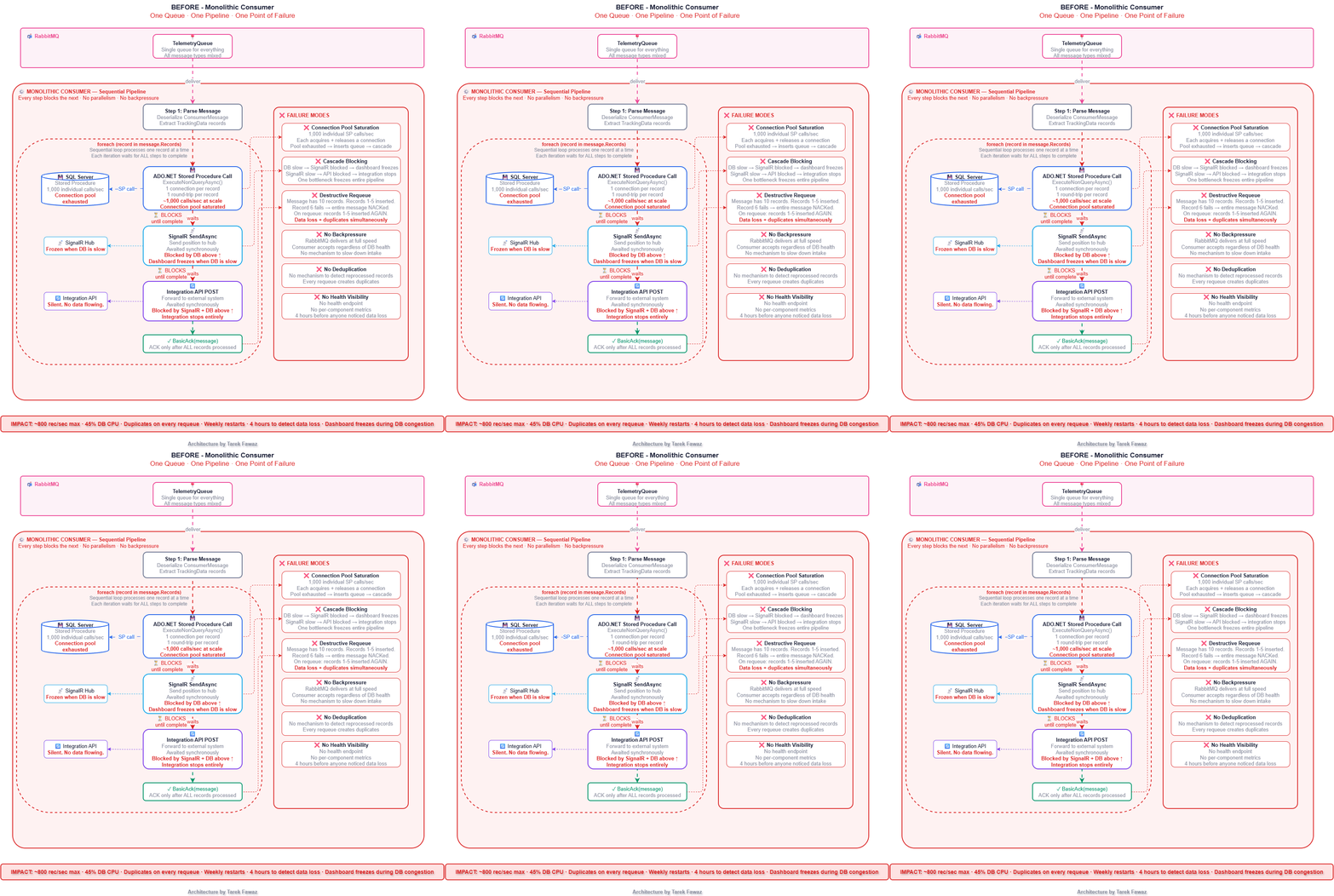
The consumer was simple. It read messages from a RabbitMQ queue, called a stored procedure via ADO.NET to insert each record, sent the position to a SignalR hub for live dashboards, forwarded a copy to an integration API, and ACKed the message. One queue. One consumer. One sequential pipeline.
Even at 2,000 devices, the cracks were showing. At peak hours the database would stall, SignalR would freeze, and messages would pile up in RabbitMQ. We treated it as "the database being slow" and moved on. Then I tried to test 10,000 simulated devices — 60,000 messages per minute — and the cracks became a collapse.
The stored procedure was fast for individual calls. But at 1,000 calls per second, the SQL Server connection pool was saturated. Inserts queued. The consumer couldn't ACK fast enough. When a batch of inserts finally failed, the consumer NACKed and requeued the entire message — but some records within that message had already been inserted. On reprocessing, those records were inserted again.
We were losing data in two ways simultaneously: some records were never persisted (dropped during congestion), and others were duplicated (re-inserted on requeue). The SignalR dashboard froze because it was blocked behind the database calls. The integration API stopped receiving data entirely.
Nobody noticed for four hours.
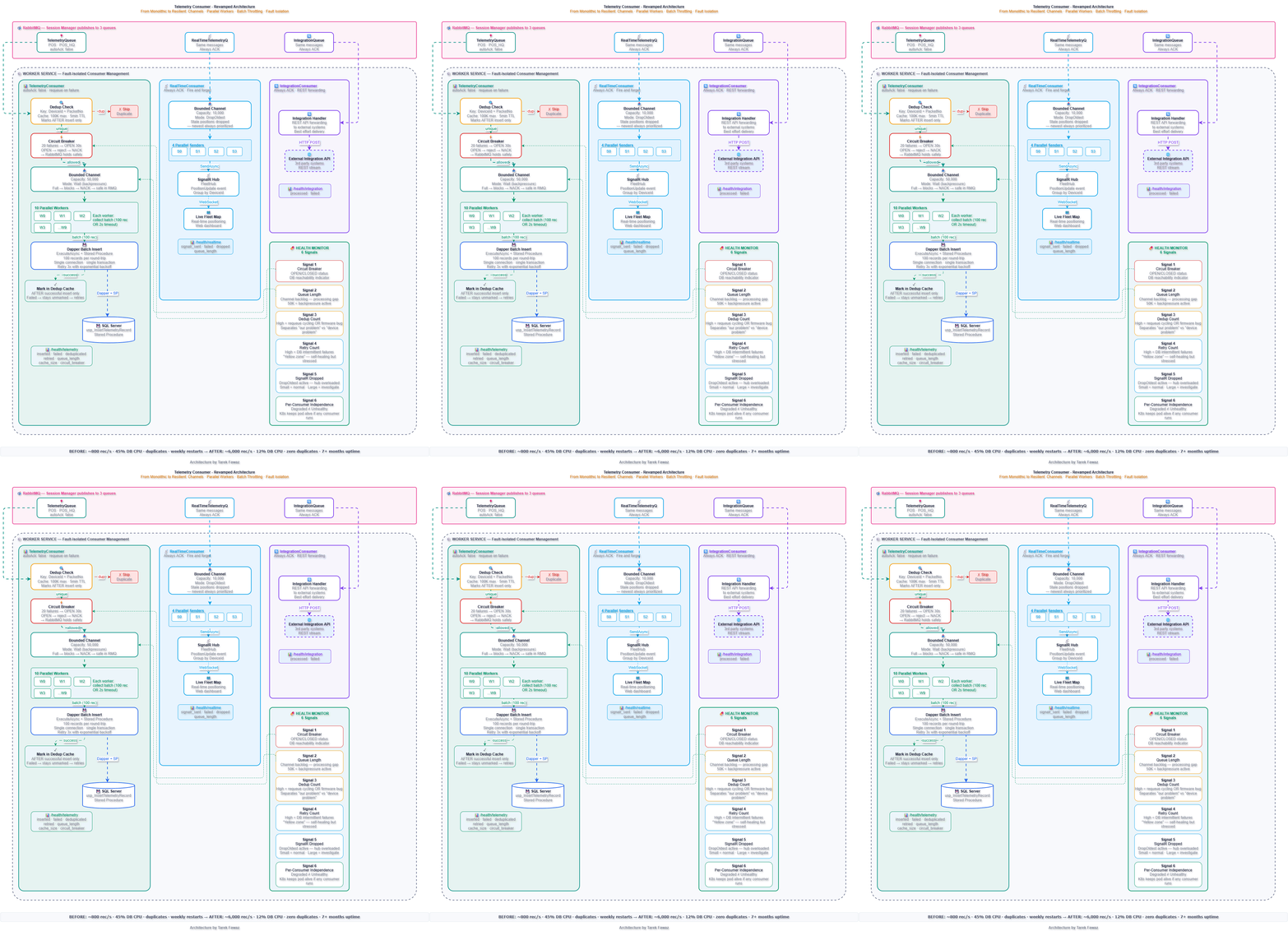
This post covers the complete re-engineering: splitting the monolithic consumer into three independent services using .NET Channels and parallel workers, adding batch throttling over stored procedures using Dapper, and building a deduplication layer that guarantees zero data loss.
Architecture: Before vs After
Bounded Channels — The Backbone of the Design
Every consumer uses a .NET Channel<T> as an internal buffer between RabbitMQ message arrival and actual processing. This is the single most important design decision in the refactor.
Without a channel, every RabbitMQ message is processed synchronously in the consumer callback. If processing is slow, the callback blocks, RabbitMQ stops delivering, and the queue backs up with no visibility. With a bounded channel, the consumer callback writes to the channel and returns immediately. Workers read and process at their own pace.
// DatabaseHandler: Wait mode — backpressure propagates to RabbitMQ
private readonly Channel<(TrackingData Data, int RetryCount)> _channel =
    Channel.CreateBounded<(TrackingData, int)>(
        new BoundedChannelOptions(50_000)
        {
            FullMode = BoundedChannelFullMode.Wait,
            SingleWriter = false,
            SingleReader = false
        });

// SignalRHandler: DropOldest — real-time data is disposable
private readonly Channel<TrackingData> _channel =
    Channel.CreateBounded<TrackingData>(
        new BoundedChannelOptions(10_000)
        {
            FullMode = BoundedChannelFullMode.DropOldest,
            SingleWriter = false,
            SingleReader = false
        });
The critical difference
TelemetryConsumer uses Wait — if the channel is full, the consumer blocks, causing RabbitMQ to stop delivering. Data stays safe in RabbitMQ. RealTimeConsumer uses DropOldest — if SignalR is slow, the oldest positions are dropped. For a live fleet map, a 10-second-old position is useless when a fresh one just arrived.
The DatabaseHandler — Batch Throttling Over Stored Procedures
The stored procedure was never the problem — it was fast, optimized, and battle-tested. The problem was calling it 1,000 times per second individually. The refactor keeps the stored procedure but adds batch throttling at the code level using Dapper.
public class DatabaseHandler : IDisposable
{
    private readonly Channel<(TrackingData Data, int RetryCount)> _channel;
    private readonly Task[] _workers;
    private readonly CancellationTokenSource _cts = new();
    private readonly string _connectionString;
    private readonly ILogger<DatabaseHandler> _logger;

    // Deduplication: DeviceId + PacketNo → insertion timestamp
    private readonly ConcurrentDictionary<string, DateTime> _dedupCache = new();

    private const int WorkerCount = 10;
    private const int ChannelCapacity = 50_000;
    private const int BatchSize = 100;
    private const int MaxRetries = 3;
    private static readonly TimeSpan BatchTimeout = TimeSpan.FromSeconds(2);
    private static readonly TimeSpan DedupWindow = TimeSpan.FromMinutes(5);
    private const int MaxCacheSize = 100_000;

    // Circuit breaker
    private int _consecutiveFailures = 0;
    private DateTime _circuitOpenedAt = DateTime.MinValue;
    private const int CircuitThreshold = 20;
    private static readonly TimeSpan CircuitResetTime = TimeSpan.FromSeconds(30);
    private readonly object _circuitLock = new();

    // Metrics
    private long _inserted, _failed, _deduplicated, _retried;
    public long Inserted => Interlocked.Read(ref _inserted);
    public long Failed => Interlocked.Read(ref _failed);
    public long Deduplicated => Interlocked.Read(ref _deduplicated);
    public long Retried => Interlocked.Read(ref _retried);
    public int QueueLength => _channel.Reader.Count;
    public int CacheSize => _dedupCache.Count;
    public bool IsCircuitOpen() => _consecutiveFailures >= CircuitThreshold
        && DateTime.UtcNow - _circuitOpenedAt < CircuitResetTime;

    public Task Enqueue(TrackingData data)
    {
        var key = $"{data.DeviceId}|{data.PacketNo}";
        if (_dedupCache.TryGetValue(key, out var ts)
            && DateTime.UtcNow - ts < DedupWindow)
        {
            Interlocked.Increment(ref _deduplicated);
            return Task.CompletedTask;
        }

        if (IsCircuitOpen())
            throw new InvalidOperationException(
                "Database circuit breaker is open");

        if (!_channel.Writer.TryWrite((data, 0)))
            throw new InvalidOperationException(
                "Database channel full — backpressure");

        return Task.CompletedTask;
    }

    private async Task WorkerLoop(int workerId)
    {
        var batch = new List<TrackingData>(BatchSize);

        await foreach (var (data, retryCount) in
            _channel.Reader.ReadAllAsync(_cts.Token))
        {
            var key = $"{data.DeviceId}|{data.PacketNo}";
            if (_dedupCache.ContainsKey(key))
            {
                Interlocked.Increment(ref _deduplicated);
                continue;
            }

            if (IsCircuitOpen())
            {
                await Task.Delay(1_000, _cts.Token);
                await _channel.Writer.WriteAsync(
                    (data, retryCount), _cts.Token);
                continue;
            }

            batch.Add(data);

            if (batch.Count >= BatchSize)
            {
                await FlushBatchWithRetry(batch, workerId);
                batch.Clear();
            }
        }

        if (batch.Count > 0)
            await FlushBatchWithRetry(batch, workerId);
    }

    private async Task FlushBatchWithRetry(
        List<TrackingData> batch, int workerId)
    {
        for (int attempt = 0; attempt <= MaxRetries; attempt++)
        {
            try
            {
                using var conn = new SqlConnection(_connectionString);
                await conn.OpenAsync();
                using var tx = conn.BeginTransaction();

                await conn.ExecuteAsync(
                    "usp_InsertTelemetryRecord",
                    batch.Select(r => new
                    {
                        r.DeviceId, r.PacketNo,
                        r.Latitude, r.Longitude,
                        r.Speed, r.Heading, r.Altitude,
                        r.EventCode, r.Timestamp,
                        ReceivedAt = DateTime.UtcNow
                    }),
                    tx,
                    commandType: CommandType.StoredProcedure);

                await tx.CommitAsync();

                // Mark ALL records AFTER successful insert
                var now = DateTime.UtcNow;
                foreach (var r in batch)
                    _dedupCache[$"{r.DeviceId}|{r.PacketNo}"] = now;

                Interlocked.Add(ref _inserted, batch.Count);
                ResetCircuit();
                return;
            }
            catch (Exception ex)
            {
                Interlocked.Increment(ref _retried);
                IncrementCircuit();

                if (attempt == MaxRetries)
                {
                    Interlocked.Add(ref _failed, batch.Count);
                    _logger.LogError(ex,
                        "[Worker {Id}] Batch of {N} failed after {Max} retries",
                        workerId, batch.Count, MaxRetries);
                }
                else
                {
                    await Task.Delay(
                        TimeSpan.FromSeconds(Math.Pow(2, attempt)));
                }
            }
        }
    }
}
Why Dapper + Stored Procedure in Batch
When you pass an IEnumerable of parameters to Dapper's ExecuteAsync with CommandType.StoredProcedure, Dapper calls the stored procedure for each parameter set — but on the same open connection within the same transaction. Instead of 100 separate connections for 100 records, you get 1 connection handling 100 procedure calls. The database can optimize internally, and the connection pool breathes.
The Dual-Trigger Batch Collector
Batches flush on whichever comes first: batch hits 100 records OR 2 seconds elapse. During peak traffic, batches fill quickly — efficient writes. During low traffic (nighttime, trucks parked), the timer ensures records don't wait minutes for 99 more records to arrive.
Why Dedup Marks AFTER Insert
Critical design subtlety
If you mark the cache BEFORE the insert and the insert fails, the record is "deduped" on retry — silent data loss. By marking AFTER, a failed insert means the record is NOT in the cache. When requeued and reprocessed, the dedup check passes and the record gets another chance.
❌ Mark BEFORE Insert
1. Receive record
2. Add to dedup cache
3. Try insert — fails
4. RabbitMQ requeues message
5. Reprocess — dedup says "already done"
6. Record skipped — silent data loss
✅ Mark AFTER Insert
1. Receive record
2. Try insert — fails
3. Cache stays untouched
4. RabbitMQ requeues message
5. Reprocess — dedup passes
6. Insert succeeds — then mark cache
7. Zero data loss
The SignalR Handler — Fire-and-Forget with Parallel Senders
public class SignalRHandler : IDisposable
{
    private readonly Channel<TrackingData> _channel;
    private readonly Task[] _senders;
    private readonly IHubContext<FleetHub> _hubContext;

    private const int SenderCount = 4;
    private const int ChannelCapacity = 10_000;

    private long _sent, _failed, _dropped;
    public long Sent => Interlocked.Read(ref _sent);
    public long Failed => Interlocked.Read(ref _failed);
    public long Dropped => Interlocked.Read(ref _dropped);
    public int QueueLength => _channel.Reader.Count;

    public SignalRHandler(
        IHubContext<FleetHub> hubContext,
        ILogger<SignalRHandler> logger)
    {
        _hubContext = hubContext;

        _channel = Channel.CreateBounded<TrackingData>(
            new BoundedChannelOptions(ChannelCapacity)
            {
                FullMode = BoundedChannelFullMode.DropOldest,
                SingleWriter = false,
                SingleReader = false
            });

        _senders = Enumerable.Range(0, SenderCount)
            .Select(id => Task.Run(() => SenderLoop(id)))
            .ToArray();
    }

    public void Enqueue(TrackingData data)
    {
        if (!_channel.Writer.TryWrite(data))
            Interlocked.Increment(ref _dropped);
    }

    private async Task SenderLoop(int senderId)
    {
        await foreach (var data in
            _channel.Reader.ReadAllAsync())
        {
            try
            {
                await _hubContext.Clients
                    .Group($"device_{data.DeviceId}")
                    .SendAsync("PositionUpdate", new
                    {
                        data.DeviceId,
                        data.Latitude, data.Longitude,
                        data.Speed, data.Heading,
                        data.Timestamp
                    });

                Interlocked.Increment(ref _sent);
            }
            catch
            {
                Interlocked.Increment(ref _failed);
                // No retry — next position in 10 seconds
            }
        }
    }
}
Key design choice
DropOldest channel mode. Real-time positions are disposable. If SignalR is slow and the channel fills, the oldest positions are dropped — the newest ones are more valuable for a live fleet map.
The Worker — Fault-Isolated Consumer Management
public class Worker : BackgroundService
{
    private readonly TelemetryConsumer _telemetry;
    private readonly RealTimeConsumer _realtime;
    private readonly IntegrationConsumer _integration;
    private readonly ILogger<Worker> _logger;

    protected override async Task ExecuteAsync(CancellationToken ct)
    {
        var tasks = new[]
        {
            SafeStart(() => _telemetry.StartAsync(ct), "Telemetry"),
            SafeStart(() => _realtime.StartAsync(ct), "RealTime"),
            SafeStart(() => _integration.StartAsync(ct), "Integration"),
        };

        await Task.WhenAll(tasks);
    }

    private async Task SafeStart(Func<Task> start, string name)
    {
        try
        {
            _logger.LogInformation("[Worker] Starting {Name}...", name);
            await start();
        }
        catch (Exception ex)
        {
            _logger.LogError(ex,
                "[Worker] {Name} failed to start — others continue",
                name);
            // Do NOT rethrow — other consumers must keep running
        }
    }
}
If the IntegrationConsumer fails to start (queue doesn't exist yet), TelemetryConsumer and RealTimeConsumer keep running. If TelemetryConsumer's circuit breaker opens during a database outage, the real-time dashboard keeps updating.
Health Monitor Signals — Why They Matter
The health endpoint is not a status page. It's an operational control surface that drives automated responses and gives the on-call engineer actionable information within seconds.
{
  "status": "Degraded",
  "telemetry": {
    "status": "Unhealthy",
    "inserted": 243500,
    "failed": 12,
    "deduplicated": 1488,
    "retried": 36,
    "queue_length": 4200,
    "dedup_cache_size": 45000,
    "circuit_breaker": "OPEN"
  },
  "realtime": {
    "status": "Healthy",
    "signalr_sent": 244800,
    "signalr_failed": 0,
    "signalr_dropped": 200,
    "queue_length": 12
  },
  "integration": {
    "status": "Healthy",
    "processed": 245000,
    "failed": 0
  },
  "summary": {
    "total_processed": 735000,
    "total_failed": 12,
    "total_deduplicated": 1488
  }
}
This response tells you exactly what's happening: the database is down (circuit breaker OPEN, telemetry queue backing up at 4,200), but the fleet map is live (SignalR healthy, only 200 positions dropped) and the integration API is flowing. Without per-consumer health signals, all you'd see is "Unhealthy" — with no idea what to fix or what's still working.
The 6 Signals and Why Each Matters
Signal 1 — Circuit Breaker
OPEN / CLOSED status of the DB circuit.
Why it matters: tells you instantly whether the database is reachable. When OPEN, the consumer stops hammering a sick DB and lets RabbitMQ hold messages safely.
Signal 2 — Queue Length
Channel backlog — gap between arrival and processing.
Why it matters: a growing queue means workers can't keep up. At 50K (capacity), backpressure kicks in — by design, not failure.
Signal 3 — Dedup Count
Cache size + duplicate count over time.
Why it matters: a spike in duplicates often indicates a device firmware bug rather than a system issue. Separates "our problem" from "device problem."
Signal 4 — Retry Count
Total batch retries across workers.
Why it matters: high retries mean the DB is intermittently failing (not fully down). The "yellow zone" — self-healing but stressed.
Signal 5 — SignalR Dropped
Positions dropped by DropOldest mode.
Why it matters: small drops are normal during burst recovery. Large or growing drops mean the SignalR hub is overloaded.
Signal 6 — Per-Consumer Independence
Degraded vs Unhealthy status semantics.
Why it matters: K8s liveness sees "Degraded" and keeps the pod running — only "Unhealthy" (all consumers down) triggers a restart.
Benchmark Tables
| Dimension | Before (Monolithic) | After (3 Consumers) |
|---|---|---|
| Queues | 1 (TelemetryQueue) | 3 (Telemetry + RealTime + Integration) |
| Workers | 1 (sequential loop) | 10 DB + 4 SignalR + 1 Integration |
| Channel buffering | None | Bounded channels (50K + 10K) |
| Backpressure | None — RabbitMQ floods consumer | Wait mode — channel blocks consumer |
| Fault isolation | None — one failure freezes all | Full — each consumer independent |
| Deduplication | None | DeviceId + PacketNo cache (100K max) |
| Circuit breaker | None | 20 failures → 30s pause |
| Health checks | None | Per-consumer with 6 signals |
| Metric | Before (ADO.NET sequential) | After (Dapper batch) | Improvement |
|---|---|---|---|
| DB round-trips/sec | ~1,000 | ~10 batches | 100x fewer |
| Connection acquisitions/sec | ~1,000 | ~10 | 100x fewer |
| Sustained throughput | ~800 rec/sec | ~6,000 rec/sec | 7.5x |
| DB CPU during writes | 45% | 12% | -73% |
| Write latency p99 | 850ms | 35ms | 24x faster |
| Connection pool saturation | Frequent | Never observed | Eliminated |
| Metric | Before | After |
|---|---|---|
| Data loss events | 2-3 per month | Zero (7+ months) |
| Duplicate records | Thousands per requeue | Zero (dedup cache) |
| Pipeline freeze duration | Hours (until restart) | N/A (fault isolated) |
| Restart frequency | Weekly | Zero |
| Mean time to detect issue | ~4 hours | ~30 seconds (health check) |
| SignalR availability during DB issues | 0% (blocked) | 100% (independent) |
| Config | TelemetryConsumer | RealTimeConsumer | IntegrationConsumer |
|---|---|---|---|
| Channel capacity | 50,000 | 10,000 | N/A (direct) |
| Full mode | Wait (backpressure) | DropOldest (disposable) | N/A |
| Workers | 10 (batch + Dapper) | 4 (parallel senders) | 1 |
| ACK mode | autoAck: false, requeue | Always ACK | Always ACK |
| On failure | Retry 3x → circuit break | Log, move on | Log, move on |
| Data semantics | Must persist (contractual) | Disposable (10s refresh) | Best effort |
The Production Outcome
Before — at 2,000 devices, already cracking
Database congestion freezes the entire pipeline
Duplicate records on every requeue cycle
No visibility into which component is failing
Data loss during database maintenance windows
~800 records/second maximum throughput
Weekly restarts
After — at 10,000 devices, stable
DB congestion only pauses persistence; real-time and integration keep flowing
Zero duplicates (dedup cache with post-insert marking)
Per-consumer health checks with 6 actionable signals
Zero data loss — bounded channels + RabbitMQ requeue
~6,000 records/second sustained (7.5x improvement)
Zero restarts for 7+ months
The three patterns that made this work: bounded channels for backpressure, parallel workers for throughput, and batch throttling to stop hammering the database. None of them are exotic. All of them are boring. And boring is what keeps you sleeping at night.
At TM-Tech Alliance, we build production-grade IoT systems. If you're dealing with high-throughput data pipeline challenges, let's talk.
Share this post
Instagram doesn't support direct web sharing — we copy a ready-to-paste caption to your clipboard.